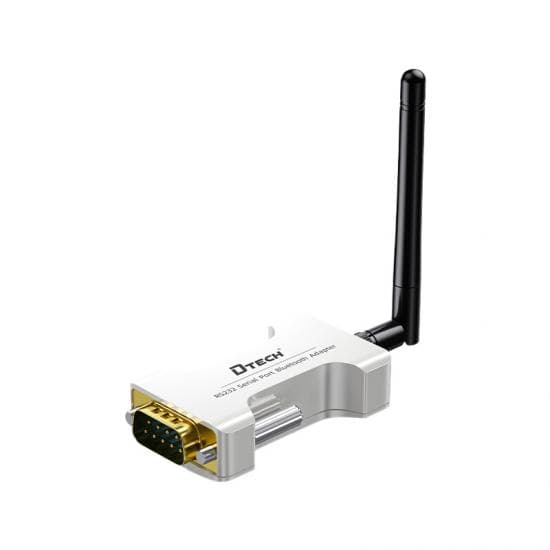
How Do You Add Bluetooth to an RS232 or RS485 Device?
Add Bluetooth to serial equipment with a matched adapter at each endpoint, then verify interface wiring, operating mode, serial framing and application behavior.
Quick Answer: Match the Local Interface Before Removing the Cable
Add Bluetooth to an RS232 or RS485 device by installing a serial adapter whose physical interface matches the equipment, then configure the adapter role and the original serial framing. Treat the wireless hop and the local serial wiring as separate layers: Bluetooth does not correct an RS232 pinout, RS485 polarity, baud-rate mismatch or application timeout. Bench-test bidirectional data before installation, then repeat the test on the real route with normal machinery and wireless activity operating. The DTECH wireless serial communication solution maps this job to a local Bluetooth role and a separately verified longer-range alternative.
What Does a Bluetooth Serial Adapter Change?
A Bluetooth serial adapter replaces a section of cable with a radio data path while retaining a local serial connection at the equipment. The field device still communicates through RS232 or RS485 electrical signaling at its connector. The adapter receives that serial data, carries it through its supported Bluetooth behavior and presents the data to a compatible remote endpoint or host application.
This is not the same as converting RS232 to RS485. RS232 is normally a point-to-point, single-ended interface, while RS485 is a differential interface commonly used for multidrop buses. Texas Instruments' RS-422 and RS-485 overview explains the differential signaling and system configurations that remain relevant on the wired side of an RS485 adapter.
Bluetooth technology also has multiple architectures and operating behaviors. The Bluetooth SIG's Bluetooth Low Energy primer explains the LE stack, connection-oriented communication and broadcast-based modes. Therefore, a label such as “Bluetooth 5.4” does not by itself identify the serial payload format, host application, supported profile or pairing workflow.
When Is Bluetooth the Right Wireless Serial Role?
Bluetooth is a practical candidate when the serial endpoints are locally accessible, a permanent cable is inconvenient and the project can verify the radio path and host software on site.
When technicians need local cable-free access
A Bluetooth adapter can support commissioning, debugging or parameter collection without leaving a long service cable connected. The engineer still needs controlled access procedures, the correct adapter mode and a documented method for returning the equipment to normal operation.
When the equipment already has a compatible serial port
The adapter should match the interface at the device. Select an RS232 form for compatible RS232 equipment and an RS485 form for a compatible RS485 connection. A DB9 connector does not prove the pinout, and a terminal block does not prove polarity or two-wire versus four-wire operation.
When the installed route can be tested directly
Bluetooth performance depends on the actual endpoint placement, enclosure, walls, machinery and competing radio activity. Do not specify a universal distance from the core-version number. Confirm the route with the exact equipment and acceptance margin.
When the application can use the supported Bluetooth behavior
The IOT5064(CH) source lists broadcast, master and slave modes plus AT-command or visual-app configuration. Those labels describe available product roles, but the system designer must still verify how the remote host discovers, connects to or receives data from the adapter.
When Should You Choose a Different Wireless Architecture?
Choose a separately verified longer-range wireless serial role when sites are dispersed, the route crosses a yard or road, or the required topology is one-to-many or many-to-many rather than a local service link. The IOT5095S TPUNB wireless serial transceiver is the comparison role here because its source lists one-to-one, one-to-many and many-to-many transmission.
Do not infer a guaranteed range from the words “long range,” TPUNB or spread spectrum. Antenna placement, obstructions, interference, settings, endpoint height and regional radio rules affect the usable path. In the United States, radio devices may fall under 47 CFR Part 15; other markets have their own requirements. Confirm the exact product and country before procurement.
How Should the Connection Architecture Be Designed?
For a two-endpoint serial bridge, document the path as: serial device → matched Bluetooth serial adapter → commissioned Bluetooth link → compatible remote adapter or host application. Keep the serial electrical design on each side independent from the radio design in the middle.
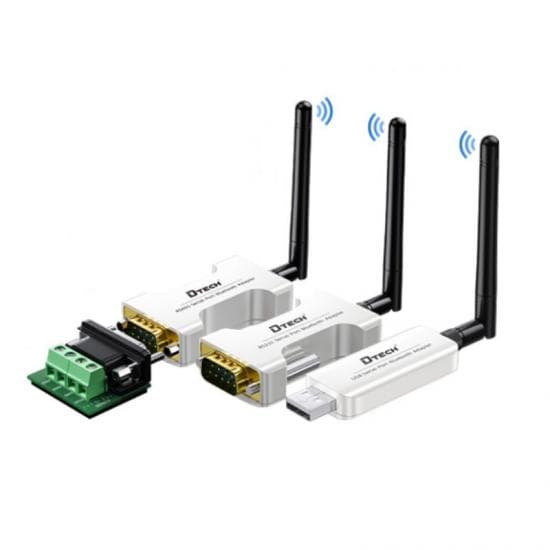
At each wired endpoint, record connector, pinout, signal direction, serial framing and power. For RS485, also record two-wire or four-wire operation, polarity, biasing, termination, node addresses and local bus length. For the wireless section, record adapter mode, device name or identifier, configuration method, host software, recovery behavior and installed endpoint positions.
How Do the Verified Product Roles Compare?
| Product role | Verified source data | Best-fit condition | Required project verification | Product page |
|---|---|---|---|---|
| Local configurable Bluetooth serial adapter | IOT5064(CH); source-listed USB, RS232 and RS485 forms; BLE 5.4; broadcast, master and slave modes; 2400–460800 bps; AT-command or visual-app configuration | Local equipment access, debugging or cable-free serial communication where the installed Bluetooth path can be tested | Exact interface form, pinout, power, host software, supported mode, radio route and application timing | IOT5064(CH) Bluetooth serial adapter |
| Dispersed-site wireless serial alternative | IOT5095S Serial; TPUNB spread spectrum; one-to-one, one-to-many and many-to-many transmission; source-characterized low-power role | Longer or dispersed routes where a local Bluetooth architecture is not appropriate | Exact serial interface, frequency/region, antenna, real-route performance, power, topology and timing | IOT5095S TPUNB transceiver |
The Bluetooth SIG's guidance on communicating supported functionality warns that combining a Bluetooth wordmark with a core-version number can lead to incorrect assumptions about supported functions. Apply the same discipline during product selection: use model-specific operating modes and interfaces rather than treating “Bluetooth 5.4” as a complete application specification.
How Do You Select and Commission the Adapter?
Step 1: Identify the exact serial interface
Record the equipment model, connector, pinout and electrical interface. If the port is uncertain, use the RS232, RS422 and RS485 comparison guide before choosing an adapter. Never select from connector shape alone.
Step 2: Record the production serial settings
Document baud rate, data bits, parity, stop bits, direction behavior and application protocol. The IOT5064(CH) source lists 2400–460800 bps, but both the equipment and adapter must be configured to the same production value.
Step 3: Choose the Bluetooth operating role
Define which endpoint initiates or accepts communication and whether the application needs a connected link or source-listed broadcast behavior. Match that plan to the adapter's master, slave or broadcast mode and to the remote software.
Step 4: Verify configuration and recovery
Use the documented AT-command or app configuration path, save the final parameters and record how a replacement unit will be commissioned. Test startup, reconnection after power loss and recovery after the host application closes.
Step 5: Bench-test both data directions
Connect the production device, adapter and real host application on a bench. Send representative messages in both directions, check error handling and verify that application timeouts remain suitable.
Step 6: Test the installed radio path
Repeat the test with the endpoints in their final positions and enclosures. Operate nearby machinery and representative wireless systems, then record the test conditions and acceptance result.
What Common Design Mistakes Should Be Avoided?
- Selecting by connector alone: identify the electrical interface and pinout before ordering.
- Treating Bluetooth as serial conversion: the radio hop does not turn RS232 into RS485.
- Assuming classic SPP support: Bluetooth LE architecture and application behavior must be verified independently.
- Using the version number as a range claim: Bluetooth Core 5.4 defines technology capabilities, not the installed range of this assembly.
- Ignoring RS485 wiring rules: polarity, topology, termination and device addressing still apply locally.
- Skipping host-software validation: a radio connection is not useful unless the application can exchange the required data.
- Ignoring security and access procedures: document configuration access, device identity and who may connect.
- Standardizing after a desk test: final enclosures, endpoint positions and surrounding equipment can change radio behavior.
What Should Be Checked Before Purchase?
- Equipment interface confirmed as USB, RS232 or RS485
- Connector, pinout and required signals documented
- Baud rate, framing and application timeout recorded
- Master, slave or broadcast role defined
- Compatible remote adapter or host software confirmed
- Power source and startup behavior documented
- Installed endpoint positions and enclosure materials reviewed
- Country and radio compliance requirements confirmed
- Bench and installed-route acceptance tests prepared
- Replacement-unit configuration and recovery procedure documented
FAQ
Can Bluetooth be added to an existing RS232 device?
Yes, when the adapter provides a compatible RS232 interface and the application can use its Bluetooth operating mode. Confirm pinout, signal requirements, serial framing, power and host software before installation.
Can one Bluetooth adapter be used for both RS232 and RS485?
Do not assume that one physical unit supports every interface. Select the source-listed USB, RS232 or RS485 form that matches the local equipment, and verify the exact connector and wiring.
Does Bluetooth change the serial baud rate?
The serial equipment and adapter must still use compatible baud rate, data bits, parity and stop bits. The IOT5064(CH) source lists a configurable serial baud-rate range of 2400–460800 bps, but the production setting must be tested with the complete application.
Is Bluetooth Low Energy the same as the classic Serial Port Profile?
No. Bluetooth LE and Bluetooth BR/EDR use different architectures, and a core-version label does not prove support for a particular profile or application behavior. Verify the adapter mode and the host software instead of assuming classic SPP compatibility.
When should a long-range wireless serial transceiver be used instead?
Use a separately verified long-range role when the endpoints are dispersed, the route is obstructed or Bluetooth coverage cannot be validated with margin. The radio technology, regional requirements, antenna placement and application timing must then be commissioned for that exact system.
What should be tested before deploying a Bluetooth serial adapter?
Bench-test both directions at the production serial settings, then test the installed route with normal machinery and wireless activity operating. Record the interface, mode, power, pairing or discovery procedure, application timeout and recovery behavior.
Authoritative Sources
- Bluetooth Core Specification 5.4, Bluetooth Special Interest Group.
- The Bluetooth Low Energy Primer, Bluetooth Special Interest Group.
- Communicating Supported Bluetooth Functionality, Bluetooth Special Interest Group.
- 47 CFR Part 15 — Radio Frequency Devices, United States Federal Communications Commission rules published in the Electronic Code of Federal Regulations.
- RS-422 and RS-485 Standards Overview and System Configurations, Texas Instruments.
Ask DTECH to Review the Bluetooth Serial Link
Send the equipment models, interface and pinout, production serial settings, required Bluetooth behavior, endpoint positions, host software, power source and country of use to the engineering team. Review the complete wireless serial communication solution, compare the verified product roles above, or request a Bluetooth serial architecture review.