When Should You Use an Unmanaged Industrial Ethernet Switch?
Use unmanaged switching for a small, loop-free Ethernet edge after verifying port count, traffic, cabinet power and environment, and management requirements.
Quick Answer: Use Unmanaged Switching for a Simple, Verified Edge
Use an unmanaged industrial Ethernet switch when a small machine-edge network needs basic Ethernet aggregation, the wiring has a documented loop-free topology, and switch-level management is not required. Count every endpoint and uplink, select suitable port speeds, and match cabinet power, temperature and installation conditions to the exact model. Choose a documented managed role if the design requires configurable VLANs, remote diagnostics, traffic controls or automatic recovery from redundant paths. The DTECH industrial Ethernet networking solution connects this decision to verified SW1000 and SW2000 product roles.
What Does an Unmanaged Industrial Ethernet Switch Do?
An Ethernet switch joins compatible Ethernet devices through separate ports and forwards frames within the local network. An unmanaged switch provides this connectivity without a user configuration interface for the management functions discussed here. Industrial construction adds model-specific installation and environmental characteristics; it does not automatically add network-management features.
For example, a cabinet may contain a PLC, an HMI, a monitoring terminal and one uplink to the plant network. The switch aggregates those Ethernet connections. It does not translate RS485 electrical signals into Ethernet, assign the PLC's application settings or replace the network owner's security policy.
The IEEE 802.3 Ethernet standard describes Ethernet MAC and physical-layer operation across specified speeds and media. A standards label must still be matched to the actual port type, cable and endpoint; it is not a guarantee of every industrial application's behavior.
When Is Unmanaged Switching a Practical Choice?
Start with the required functions rather than the number of ports alone. A simple device cluster can be a good candidate when the network owner approves one local segment, the cable map is easy to inspect and the application can be tested under representative traffic.
When the machine has a small, stable device list
A fixed group of Ethernet endpoints is easier to document than a continually changing plant network. List every device and the uplink before choosing a model. Leave an intentional service or expansion allowance instead of filling the last port on the day of commissioning.
When management is handled elsewhere in the architecture
An upstream managed network can provide functions outside the local switch, but only within an approved design. Do not assume upstream security or VLAN configuration compensates for every uncontrolled connection downstream. State where segmentation, monitoring and access decisions are actually enforced.
When local maintenance is sufficient
A clearly labeled cabinet can support straightforward physical troubleshooting: inspect power, link indicators, connectors, cables and endpoint settings. If maintenance teams require remote port counters, alarms or configuration changes, specify those functions explicitly instead of discovering their absence after installation.
Cisco's managed-versus-unmanaged overview distinguishes basic plug-and-play connectivity from configurable control and performance visibility. This is the functional decision boundary; rugged hardware alone does not remove it.
When Should You Specify a Managed Role Instead?
Choose a separately documented managed switch when the project requires control or visibility that the selected unmanaged model does not establish. Requirements may include configurable VLANs, traffic prioritization, multicast handling, port security, remote monitoring or a defined redundant topology. Verify each function on the exact device.
The IEEE 802.1Q bridges and bridged networks specification addresses bridged networks and VLANs. An Ethernet port supporting IEEE 802.3 does not therefore prove that its switch exposes configurable VLAN features.
Likewise, a ring or two active uplinks requires a deliberate loop-control design. Cisco's industrial spanning-tree documentation explains how a Layer 2 control protocol can prevent loops while permitting redundant paths. Do not assume that behavior on SW1000 or SW2000 because both have multiple ports.
How Should the Edge Connection Be Designed?
Use a documented path: Ethernet endpoints → selected industrial switch → one approved uplink → plant network or host system. Each arrow should correspond to an actual cable and port on the installation drawing. Show the power supply separately from the data connections.
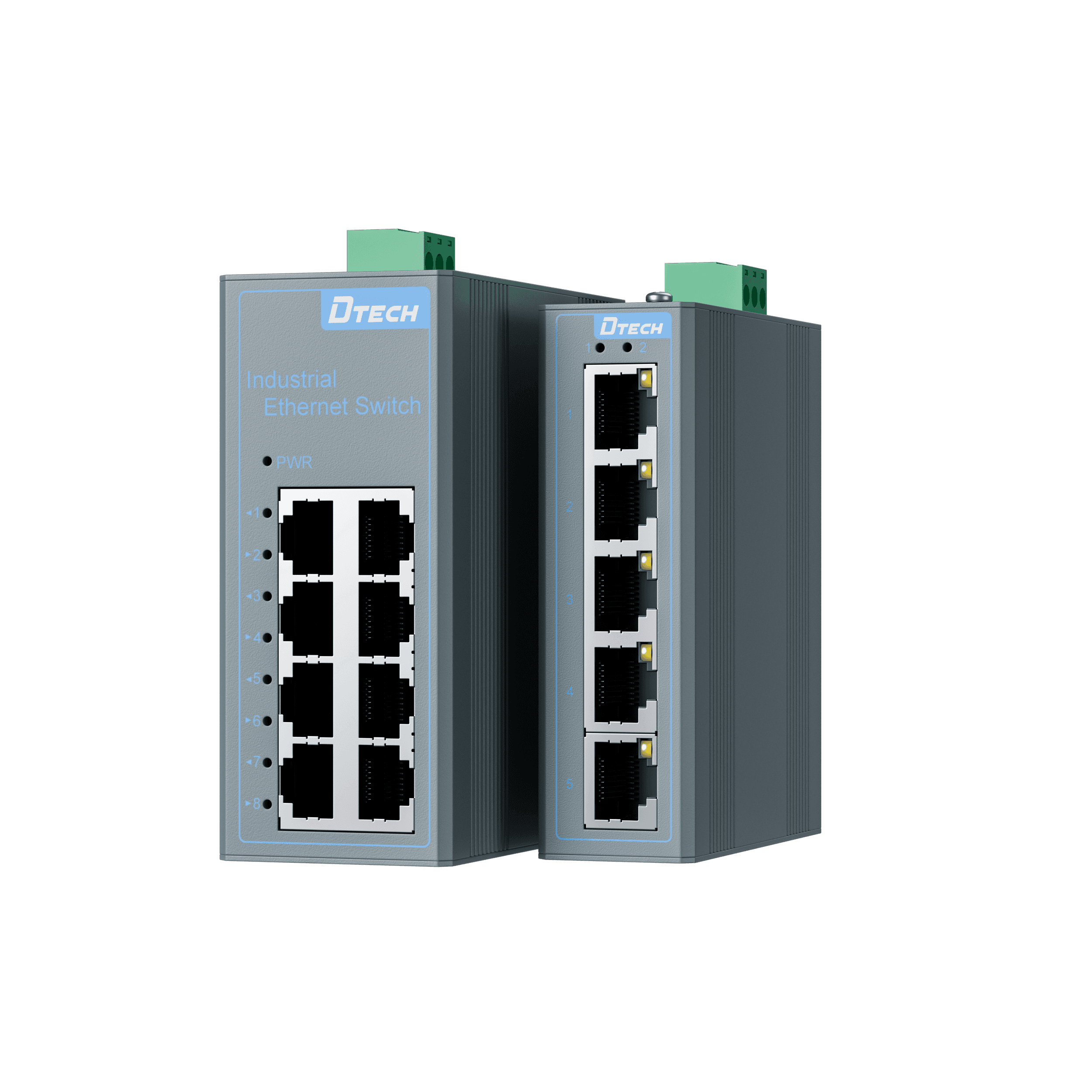
For a five-port model, four endpoints plus one uplink use all five ports. If a service laptop must connect without unplugging equipment, allow another port or an approved service method. This is port arithmetic, not a claim that all device groups produce the same load.
Avoid creating an undocumented second path back to the same network. Also identify who owns device addressing, the upstream connection and maintenance access. A powered switch with illuminated links can still carry an incorrectly configured or overloaded application.
Which Verified Product Role Fits the Cabinet?
The following table uses the current model-specific product records and downloadable specifications. It compares selection conditions rather than claiming that one family is universally better.
| Selection dimension | SW1000 Series | SW2000 Series | Engineering decision |
|---|---|---|---|
| Verified copper ports | 5 or 8 RJ45 ports | 5 or 8 RJ45 ports | Count endpoints, uplink and service allowance |
| Rate options | Fast Ethernet 10/100 Mbps or Gigabit 10/100/1000 Mbps | Fast Ethernet 10/100 Mbps or Gigabit 10/100/1000 Mbps | Match the exact FT or GT model to traffic and endpoint rates |
| Operating temperature | -30°C to 70°C | -40°C to 85°C | Compare the actual cabinet temperature with the selected model |
| Power and installation | Dual DC 12–52V; fanless; IP40; 35 mm DIN rail | Dual DC input; model sheets give rated 12/24/48 VDC and 10.8–52.8 VDC range; fanless; IP40; 35 mm DIN rail | Confirm voltage, polarity, protective ground and model instructions |
| Product role | Local unmanaged edge aggregation within the documented environmental range | Local unmanaged edge aggregation where the wider documented temperature range fits | Neither record establishes managed networking or PoE sourcing |
Use the SW1000 family page for its four verified 5FT, 8FT, 5GT and 8GT options. The SW2000 family page documents SW2000-5FT-IU-2D, SW2000-8FT-IU-2D, SW2000-5GT-IU-2D and SW2000-8GT-IU-2D. Additional port-count variants are outside this comparison until their exact documents are verified.
How Do You Select and Commission the Switch?
Step 1: Define the network's required functions
Write down whether the edge needs only forwarding or also switch-level configuration, diagnostics, security or redundant-path recovery. Get the plant network owner's approval. Cisco's switch-type comparison shows why management requirements should be chosen explicitly.
Step 2: Count ports and draw every path
Include controllers, HMIs, instruments, monitoring devices, the uplink and an intentional service allowance. Label each connection on the drawing. Check that no cable closes a loop through another cabinet or upstream device.
Step 3: Estimate traffic at the shared uplink
Record normal and peak application traffic, including image transfer, software updates and concurrent monitoring. Compare the aggregate demand with the actual uplink and endpoint rates. A Gigabit switch does not remove a slower endpoint, cable fault or upstream bottleneck.
Step 4: Match power and environment
Check the exact supply voltage, polarity, input terminals, grounding instructions, cabinet temperature and mounting clearance. Use the SW2000 model-sheet range when confirming its supply rather than silently treating a rounded family label as the detailed electrical limit. Dual inputs do not prove independent upstream supplies.
Step 5: Inspect the physical installation
Mount the device according to its instructions and provide the required clearance for natural cooling. Protect connectors from mechanical strain and assess dust, moisture and condensation at the cabinet level. Do not translate an IP40 product label into a waterproof installation claim.
Step 6: Test the real application and document recovery
Test each endpoint, then run representative simultaneous traffic through the installed uplink. Confirm the system's behavior after a planned supply interruption, cable removal and reconnection where the equipment's maintenance procedure permits. Record acceptance conditions and results; no unperformed benchmark should appear in a specification.
What Common Selection Mistakes Should Be Avoided?
- Choosing only by port count without recording the uplink and service connection.
- Treating dual DC inputs as automatic protection against cable or network failure.
- Adding a second active uplink without documented loop prevention.
- Expecting managed VLANs, telemetry or traffic controls from a basic unmanaged role.
- Assuming an RJ45 connector proves PoE sourcing.
- Using a temperature rating without checking heat inside the final enclosure.
- Comparing marketing names instead of exact FT/GT model records.
- Treating link indicators as proof that application timing and addressing are correct.
What Should Be Checked Before Ordering?
Confirm the endpoint list, exact switch model, port-rate requirement, uplink demand, loop-free cable map, power supply and cabinet conditions. Record who will diagnose failures and which measurements they require. If the maintenance plan depends on functions not documented for the selected switch, resolve that gap before procurement.
The switch is one part of the connection architecture. Keep serial conversion, Ethernet forwarding, endpoint addressing, application behavior and power delivery as separate checks so a successful test at one layer does not hide a failure at another.
FAQ
When is an unmanaged industrial Ethernet switch a suitable choice?
Use one for a small, documented edge network that needs basic Ethernet aggregation without switch-level configuration. Confirm that the plant design does not require managed VLANs, loop-recovery protocols, remote telemetry or other unverified functions at that location.
Can an unmanaged switch create separate VLANs?
Do not treat an unmanaged model as a configurable VLAN boundary. If the project needs separate broadcast domains, access rules or tagged-port configuration, select equipment with explicitly documented management capabilities and an approved network design.
Can I connect two uplinks for redundancy?
Not without a verified loop-control design. Two active paths can create an Ethernet loop; choose and configure documented redundancy or spanning-tree capabilities rather than assuming extra cables provide safe failover.
Does dual DC input provide network redundancy?
No. Two power inputs address the power-supply path under the model's documented conditions. Cable, port, switch and upstream-network failures require separate topology and recovery planning.
Should I choose Fast Ethernet or Gigabit?
Choose from the connected devices' supported rates, expected traffic and shared uplink demand. Gigabit can add capacity when all relevant links support it, but it does not make a 100 Mbps endpoint faster or guarantee an application's timing.
Can SW1000 or SW2000 power a PoE device?
The verified model records used in this guide specify DC-powered switches and do not establish PoE sourcing. Use a separately verified PoE switch or injector matched to the powered device instead of inferring PoE from an RJ45 connector.
Authoritative Sources
- IEEE 802.3-2022 — Standard for Ethernet.
- IEEE 802.1Q-2022 — Bridges and Bridged Networks.
- Cisco — Managed Switches vs Unmanaged Switches.
- Cisco — Industrial Spanning Tree Protocol Overview.
- Cisco — Unmanaged, Smart and Managed Switches.
Ask DTECH to Review the Ethernet Edge
Send the endpoint list, port rates, peak traffic, uplink path, supply arrangement, cabinet temperatures and required management functions. Review the industrial Ethernet networking solution, compare the two verified family pages, or request a switch-selection review before selecting the cabinet hardware.